
오픈소스 · Apache-2.0 · Codex와 Claude Code용
Keep the thread.작업의 맥락을 이어갑니다.
코딩 에이전트는 지난주에 정한 결정을, 왜 그렇게 정했는지 모르는 채로 뒤집을 수 있습니다.
Whyve는 결정과 그 이유를 저장소 안의 Markdown으로 남겨 두고, 다음 세션이 방향을 바꾸려 할 때 다시 꺼내 놓습니다.
$ codex plugin marketplace add https://github.com/swimit-io/whyve.git
$ codex plugin add whyve@whyve
$ claude plugin marketplace add https://github.com/swimit-io/whyve.git --scope user
$ claude plugin install whyve@whyve --scope user플러그인, 라이브러리, CLI 모두 Node.js 20.20.0 이상이 필요합니다.
memory 플러그인이 하나 더 필요한 게 아닙니다.
memory 도구는 "무슨 일이 있었지?"에 답합니다. Whyve는 "우리가 왜 이렇게 정했고, 이걸 바꿔도 되나?"에 답합니다.
claude-mem과 Claude Code 내장 auto memory는 세션에서 일어난 일을 자동으로 담습니다. Whyve가 남기는 것은 그보다 좁습니다. 조용히 뒤집히면 안 되는 선택을, 이유와 적용 범위, 무엇이 무엇을 대체했는지까지 함께 기록합니다. 무엇을 남길지는 사람이 승인하거나, 알아서 기록하는 모드를 고르면 됩니다.
둘은 함께 씁니다. 쓰던 memory 도구는 그대로 두고, 결정만 Whyve에 맡기세요.
claude-mem은 무슨 일이 있었는지를 기억합니다. Whyve는 왜 그렇게 정했는지를 지킵니다.
결정 하나를 두 세션, 세 번의 요청에 걸쳐 따라가 봅니다.
README에 있는 예제 그대로입니다. 설치한 뒤 내 프로젝트에서 직접 해 보세요. 어두운 상자는 녹화에 쓴 실제 실행의 답을 고치지 않고 옮긴 것입니다. 녹화는 영어로 진행했습니다.
1. 첫 세션에서 정하기
이 체험판은 CSV만 지원하고 Excel은 다음으로 미루기로 결정했어. 첫 사용 흐름을 빨리 검증하려는 선택이야. 이 결정을 기억해 줘.
$ claude -p "I decided this trial will support CSV only and leave Excel for later. I want to validate the first-use flow quickly. Remember this decision."
I saved this as a project decision: the trial will support CSV only, and Excel is left for later. The reason is to validate the first-use flow quickly. There was no earlier decision on file formats, so nothing conflicts with it.

- File: context/decision/Trial-supports-CSV-only-Excel-deferred.md
- Scope: trial-importer, with the decision key trial-import-file-formats

You didn't say when to come back to Excel support, so I didn't record a condition for that. If you want one, such as "once the first-use flow is validated," tell me and I'll add it.

$ ls context/decision
Trial-supports-CSV-only-Excel-deferred.md
decision.index.md
Whyve가 무엇을 기록했는지, 결정과 이유를 확인해 줍니다.
2. 새 세션에서 이유 묻기
우리가 Excel 지원을 미룬 이유가 뭐였지?
$ claude -p "Why did we postpone Excel support?"
Excel support was postponed to validate the first-use flow quickly.

The current decision for trial-importer (context/decision/Trial-supports-CSV-only-Excel-deferred.md) says:

- Decision: This trial supports CSV only. Excel support is left for later.
- Rationale: Validate the first-use flow quickly.
- Rejected alternatives: Supporting Excel in this trial (deferred to later).

The record doesn't set a condition for when to revisit Excel. It is deferred, not ruled out, so bringing it back is still an open choice for later.
새 세션은 앞의 대화를 모릅니다. 저장된 이유를 읽어서 답합니다.
3. 같은 세션에서 나중에 바꿔 보자고 하기
Excel도 이번 체험판에 넣는 건 어떨까? 아직 결정 변경은 아니야.
$ claude -p --continue "What about including Excel in this trial too? I haven't decided to change the decision yet."
This would conflict with the current decision for trial-importer (trial-import-file-formats):

- Decision: "This trial supports CSV only. Excel support is left for later."
- Rationale: "Validate the first-use flow quickly."
- Rejected alternatives: "Supporting Excel in this trial (deferred to later)."

The record has no condition for revisiting it, so nothing in it signals that now is the time. Since you haven't decided, I'm treating this as discussion only. I won't change any code or the decision record.

Reasons to keep CSV only:
- It still fits the stated goal. The first-use flow gets validated with fewer moving parts.
- Excel adds work that isn't about the flow itself: sheets, merged cells, dates stored as numbers, formulas, encoding quirks, and a new parsing library.
- If the trial goes badly, you'll know the cause is the flow, not the file parsing.

Reasons to add Excel now:
- If most target users keep their data in .xlsx, a CSV-only trial may measure people giving up at the export step, not the flow itself.
- If the import pipeline is already format-neutral, adding Excel later may cost about the same as adding it now.

A middle option: keep CSV only, but track how often users try to upload .xlsx or ask for it. That gives you evidence for when to revisit without changing scope.

When you're ready to decide: keep CSV only for this trial, or supersede the decision and include Excel? If you choose supersede, I'll update the decision record and then start the implementation work.
Whyve는 이 제안을 기존 결정과 그 이유 옆에 나란히 놓습니다. 아무것도 바뀌지 않습니다. 사람이 정하기 전까지 제안은 제안일 뿐입니다.
세션 ID와 버전까지 담긴 전체 기록: assets/demo/transcript.txt
기록 규칙을 내가 고르는 Markdown 기록.
기록은 context/ 폴더의 Markdown 파일입니다. Git은 쓰든 안 쓰든 괜찮습니다. 별도 서버도, 데이터베이스도, API 키도 필요 없습니다.
프로젝트에서 $whyve:init을 실행해 어떤 기록 종류를 쓸지, 기록을 어떻게 승인할지 고릅니다. 처음에는 Decision과 explicit으로 시작합니다.
| 종류 | 담는 것 |
|---|---|
| Decision | 내린 선택과 그 이유, 무엇을 대체했는지 |
| Assumption | 확인 전까지 참이라고 두는 전제 |
| Term | 이 프로젝트에서 특별한 뜻을 갖는 용어 |
| Intent | 프로젝트의 목적과 완료의 모습 |
| Document | 계속 최신으로 유지하는 설명 문서 |
| Observation · Snapshot · Archive | 항상 사용 가능: 확인된 사실, 멈춘 지점, 채택한 원문 |
| 모드 | 기록하는 때 |
|---|---|
explicit — 명시적 승인 | 분명한 결정 발언이나 "기억해 줘" 자체가 승인입니다. 의미나 범위가 불분명할 때만 되묻습니다. |
auto — 자동 기록 | 기록할 만한 맥락을 건마다 묻지 않고 저장합니다. |
adaptive — LLM 판단 | 바로 기록할지, 확인이 필요한지 모델이 판단합니다. |
어떤 모드에서도 모델이 자기 선호를 사람의 결정으로 기록하지 않습니다.
이미 쓰는 에이전트에 명령 두 줄이면 됩니다.
$ codex plugin marketplace add https://github.com/swimit-io/whyve.git
$ codex plugin add whyve@whyve$ claude plugin marketplace add https://github.com/swimit-io/whyve.git --scope user
$ claude plugin install whyve@whyve --scope user플러그인, 라이브러리, CLI 모두 Node.js 20.20.0 이상이 필요합니다.
설치한 뒤 호스트를 다시 불러오거나 새 세션을 열고, 프로젝트에서 $whyve:init(Codex) 또는 /whyve:init(Claude Code)을 실행하세요.
TypeScript 라이브러리나 CLI를 직접 쓰려면 설치·라이브러리 API 문서를 참고하세요.
기존 context-* 플러그인을 쓰고 있다면 먼저 비활성화하세요. 두 세대를 함께 돌리지 않습니다.
확인한 것과 아직 확인하지 못한 것.
아직인 것
잘 관리한 Markdown이나 ADR보다 더 정확하다거나, 토큰이나 비용이 덜 든다는 점은 입증하지 못했습니다. 실제 팀에서 오래 썼을 때의 효과도 아직 재지 않았습니다. 도움이 되는지는 위의 두 세션 예제로 직접 판단하는 것이 가장 빠릅니다.
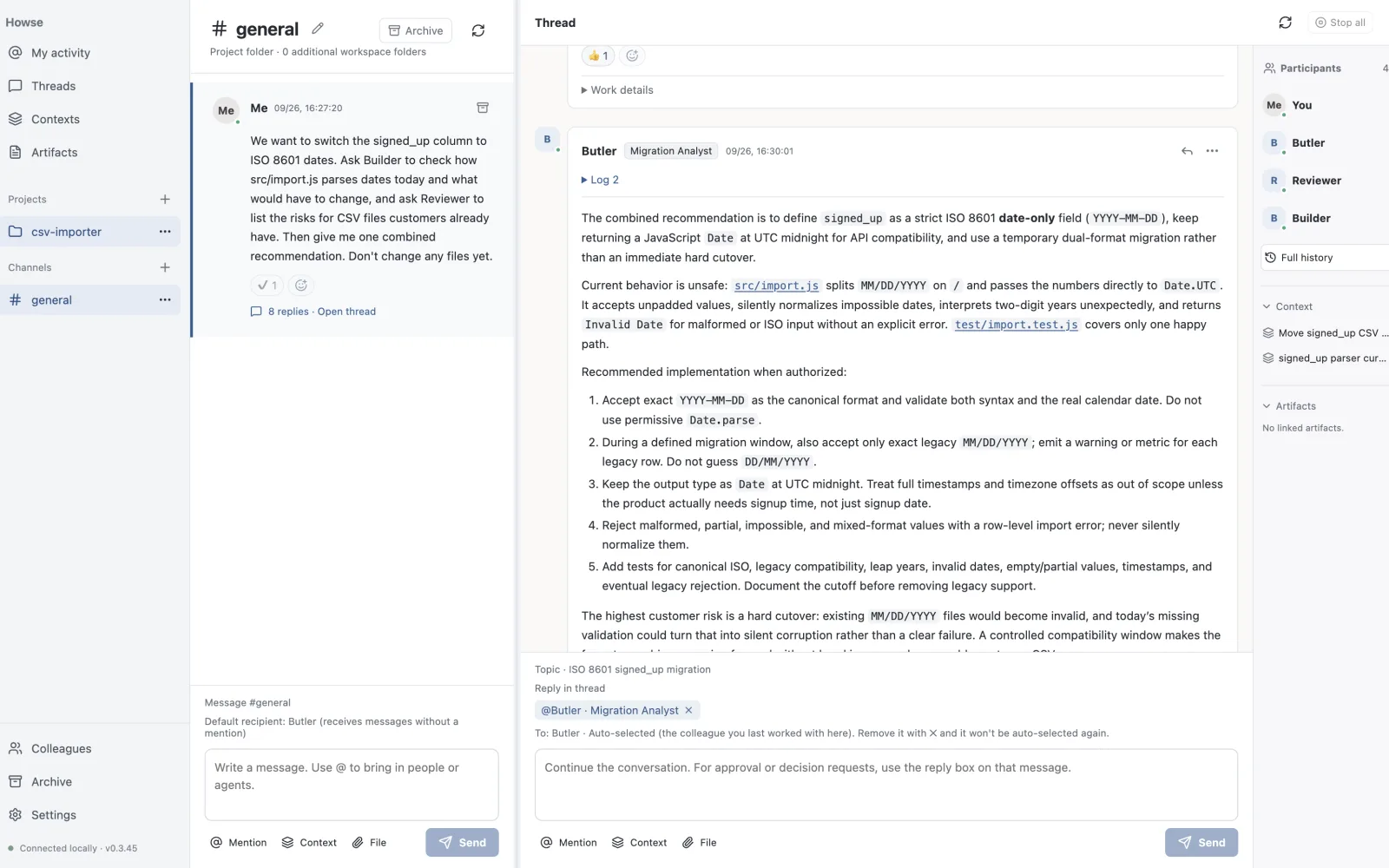
Whyve로 만든 첫 제품, Howse

Howse는 여러 코딩 에이전트를 한 팀처럼 움직이게 하는 macOS·Windows용 데스크톱 앱입니다(Windows는 베타). Codex와 Claude Code가 역할을 맡아 스레드 안에서 서로 일을 넘기고, 사람의 승인이 필요한 곳에서 멈춥니다. Whyve가 들어 있어서 한 에이전트의 세션에서 내린 결정을 다음 에이전트도 압니다.
Whyve Cloud를 준비하고 있습니다.
어느 기기에서 작업하든 같은 컨텍스트를, Git 없이 맞춰 둡니다. Whyve 자체는 지금처럼 오픈소스이고 로컬에서 동작합니다.
이름에 담은 뜻
Whyve와 Howse는 한 가지 믿음에서 나왔습니다. 에이전트와 함께 일할 때, 그 일의 이유와 팀이 일하는 방식은 내가 가진 파일로 남아 있어야 한다는 것입니다.
Whyve = why + weave
Whyve는 why(왜)와 weave(엮다)를 합친 이름입니다. 선택의 이유를 한 올로 엮어 세션에서 세션으로 이어 갑니다. 형제 제품 Howse는 how(어떻게)와 house(품다)를 합친 이름으로, 에이전트들이 일하는 방식을 한 집에 품습니다.
Whyve가 바탕이고, Howse는 그 위에 지은 첫 제품입니다.
만든 사람: Jinwuk Lee · @Jeis-Jw